
Clock 3D Wood HD3.1 - App Store
You'll be able to see results in few seconds.
Publisher Description
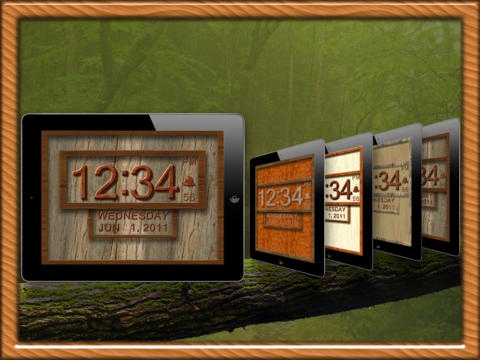
The ultimate 3D Wood Clock with user selected theme styles!
Mix and match from 10 Border, 10 Frame, 10 Back and 5 Font styles to create over 5000 unique possible combinations.
All the features and no iAds with the paid version...
Features
- Wood Styled 3D Designer HD Clock.
- Customize your own Wood Theme Design!
- iTunes Music option for Alarm - wake to your own music.
- Background Alarms, works if in Background, Locked or Sleeping!
- Full Alarm functions with adjustable Alarm and Snooze durations.
- 12 or 24 hour mode selectable.
- 20 built-in preset Alarm sounds.
- Full Date display with Day of week, Month, Day and Year.
- Dazzling animated semi-transparent on-screen menus.
- Supports all Landscape and Portrait modes.
- Full on-screen display for both Alarm Status and Controls.
- Built-in Help Screen.
- Dim display by simply swiping display up or down.
- Alarm volume level saved for control over playback.
- Seconds display with On/Off feature.
- Night Display Mode for night time viewing.
- Alarm assistant that displays "time until alarm" while setting alarm.
- Real-time countdown to view time until alarm rings.
- Real-time countdown to view Snooze time remaining.
- Visual Alarm Screen Flasher option for hearing impaired or silent notification.
- Plus much more...
Requires iOS 5.1.1 or later. Compatible with iPad.
About Clock 3D Wood HD
The company that develops Clock 3D Wood HD is Thought Force LLC. The latest version released by its developer is 3.1.
To install Clock 3D Wood HD on your iOS device, just click the green Continue To App button above to start the installation process. The app is listed on our website since 2011-06-18 and was downloaded 0 times. We have already checked if the download link is safe, however for your own protection we recommend that you scan the downloaded app with your antivirus. Your antivirus may detect the Clock 3D Wood HD as malware if the download link is broken.
How to install Clock 3D Wood HD on your iOS device:
- Click on the Continue To App button on our website. This will redirect you to the App Store.
- Once the Clock 3D Wood HD is shown in the iTunes listing of your iOS device, you can start its download and installation. Tap on the GET button to the right of the app to start downloading it.
- If you are not logged-in the iOS appstore app, you'll be prompted for your your Apple ID and/or password.
- After Clock 3D Wood HD is downloaded, you'll see an INSTALL button to the right. Tap on it to start the actual installation of the iOS app.
- Once installation is finished you can tap on the OPEN button to start it. Its icon will also be added to your device home screen.
Program Details
System requirements
Download information
Pricing
Version History
version 3.1
posted on 2011-06-18
Disclaimer
Official App Store Link
We do not host Clock 3D Wood HD on our servers. We did not scan it for viruses, adware, spyware or other type of malware. This app is hosted by Apple and passed their terms and conditions to be listed there. We recommend caution when installing it.
The App Store link for Clock 3D Wood HD is provided to you by apps112.com without any warranties, representations or guarantees of any kind, so access it at your own risk.
If you have questions regarding this particular app contact the publisher directly. For questions about the functionalities of apps112.com contact us.
